How I, A Low-Tech No-Talent Noob, Made an AI-Free Book Trailer

It takes longer, but it’s worth it for the sheer satisfaction of gazing upon your work, knowing you damn well made that, with your own two hands. You know: making things. The stuff that writers and artists do.

My journey towards a homemade book trailer began a year ago, as soon as I received the cover design for my novel Lightborne‘s paperback edition, which I fell in love with instantly. I could imagine the face of my protagonist, Christopher Marlowe, fading into view through the peephole of the O, the fabric background, firelit, breathing in a draft as something – a knife, perhaps – slashes right through it. Basically, I knew at first sight how I would have liked to have seen the cover animated, book trailer style.
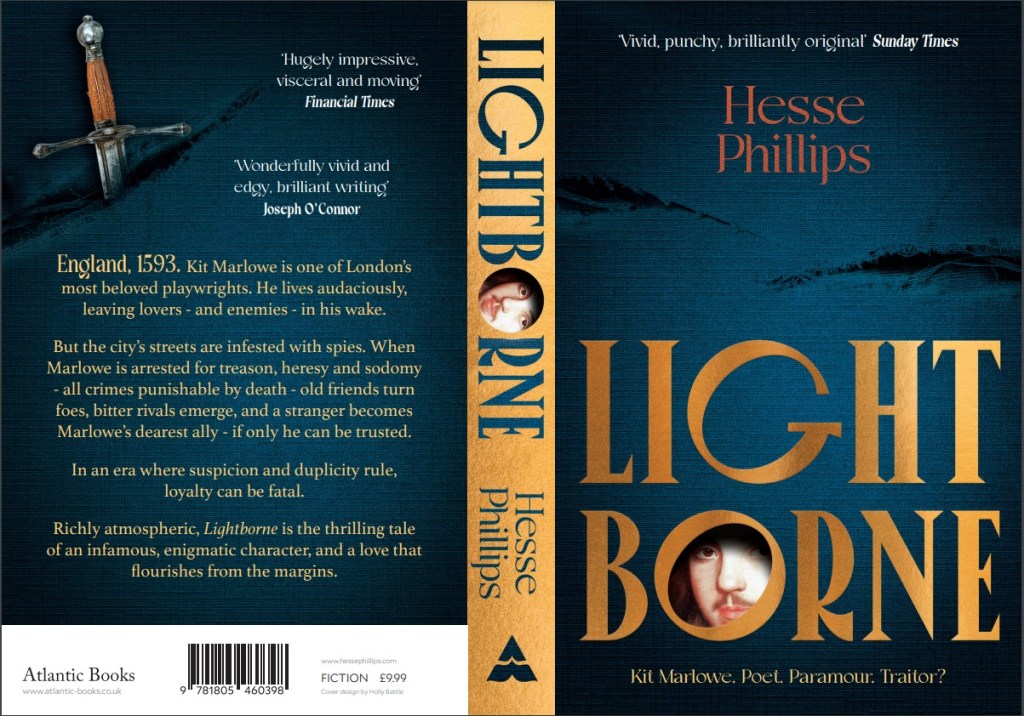
The full-spread paperback cover of Lightborne. This is the preview I initially received from my publisher, and the image that started it all.

But sadly, an animated book trailer was not in the budget for an itty-bitty D-lister like me, so if I wanted to see that vision come to life, I had to roll up my sleeves and figure it out. Figure it out I did, using freely available video and image editing software, and the old “stop-motion” technique that gave us Wallace & Gromit, Return of the Jedi and Jason and the Argonauts, and dates back to the dawn of animation.1

This is not intended to be a tutorial. But if you, like me, are incredibly stubborn, lightly artsy, and willing to spend a good 8 hours on something you can be proud of, you too can make a book trailer with a wee carbon footprint and no sweatshop labor involved but your own.

Please note: This post is meant to inspire you, but as the title suggests, I did this despite not knowing what the hell I was doing. So no, I probably can’t help you make your own book trailer. Nor can I make it for you. Unless you pay me. A lot.

Read on if you want a breakdown of how I did it, or just scroll to the bottom to see the finished trailer in all its glory.

What I had to work with:

  • High-resolution image file of my cover (see above).
  • Krita image editing software (open access).
  • CapCut video editor (free version).
  • Dim memories of Photoshop 6.0.
  • That one video editing class I dropped out of in 9th grade.

First order of business was to separate the book’s cover design into a series of layers, from background to foreground. I did this by thinking about what elements I wanted to animate, and in what order. I knew I wanted my trailer to begin with the “rips” being torn into the blue fabric, so I needed a completely clean, rip-free version of the fabric background to start with. To make this, I used the Smart Patch tool in Krita.
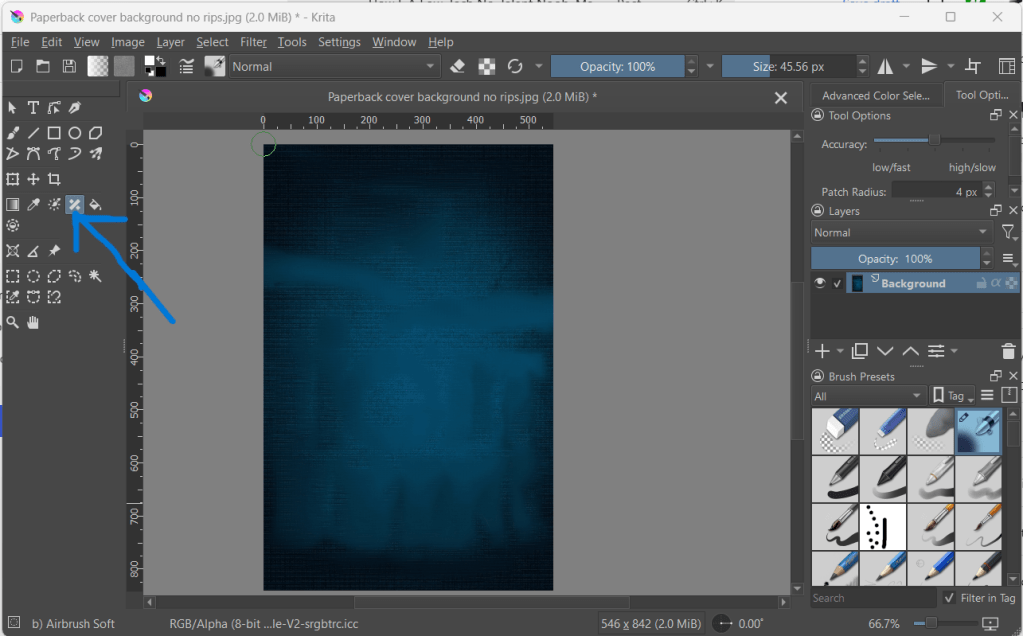
Blue arrow is pointing to the Smart Patch tool. I guess it’s meant to look like a cartoon Band-Aid.

Krita is relatively user friendly if you’re familiar with Photoshop – even Photoshop from 20 years ago. I have my beefs with Krita’s interface, but with a few YouTube tutorials I was able to find my way around. The Smart Patch tool works like Photoshop’s clone or stamp tool. You hover over the part of the image you want to sample, Right-Click+Shift, and then “patch” over the part of the image you want to disappear or blend into the background.

To create an unripped version of the blue fabric, I sampled from “clean” parts of the fabric until I had patched over everything else – title, my name, the rips, etc. And yes, this took a while.

But in the end, I had what I needed – the first “frame” of my animation.
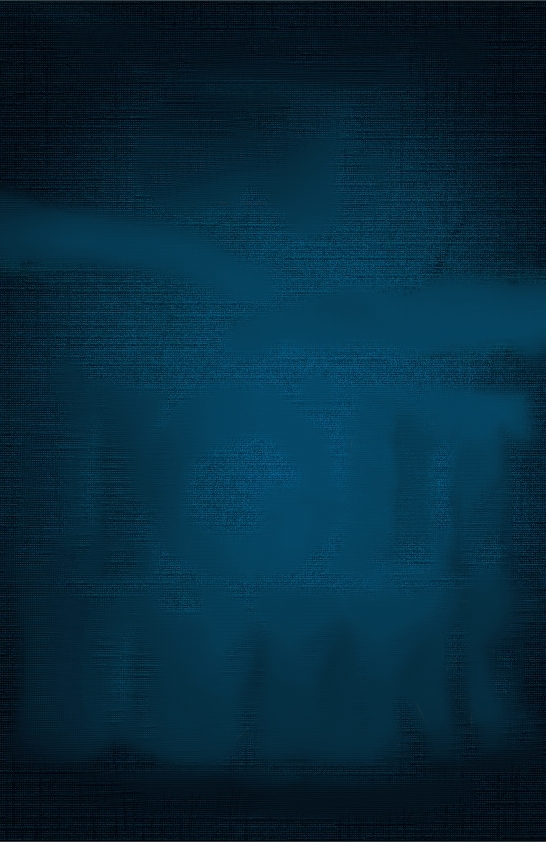
Look at it all blank and empty and lifeless, like Frankenstein’s Monster with no brain.

While I was doing this, I also created versions of the cover that preserved the elements I wanted to fade in one at a time in the final trailer, such as the title, the face of Kit Marlowe, my name, the tagline, etc. This also took some time.
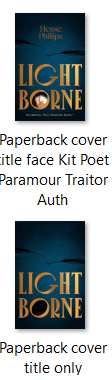
To the left you can see a couple of examples, along with my very helpful, very descriptive file-naming method. The top image was used in the final stages of the animation, because it shows most of the cover’s elements in place.

The bottom image shows a version of the cover with every element Smart Patched out except for the title and the rips in the fabric – because remember, I wanted the rips to appear first, followed by the title, followed by the face.

But I didn’t just want the rips in the fabric to gently fade in – I wanted the fabric to be torn apart right before our eyes. To achieve that, according to the stop-motion animation method, I needed a series of images that showed the fabric ripping, little by little. I had frame 1 of my animation ready. Now I needed about 30 more.

With the unripped blue fabric image open in Krita, I imported a copy of the original, high-res cover image as a Layer. Then, I cropped the image down to just the part I needed: the rip on the righthand side. Because I imported it as a Layer, what I was left with was a clipping which I could move around and manipulate as I desired, without disturbing the background.
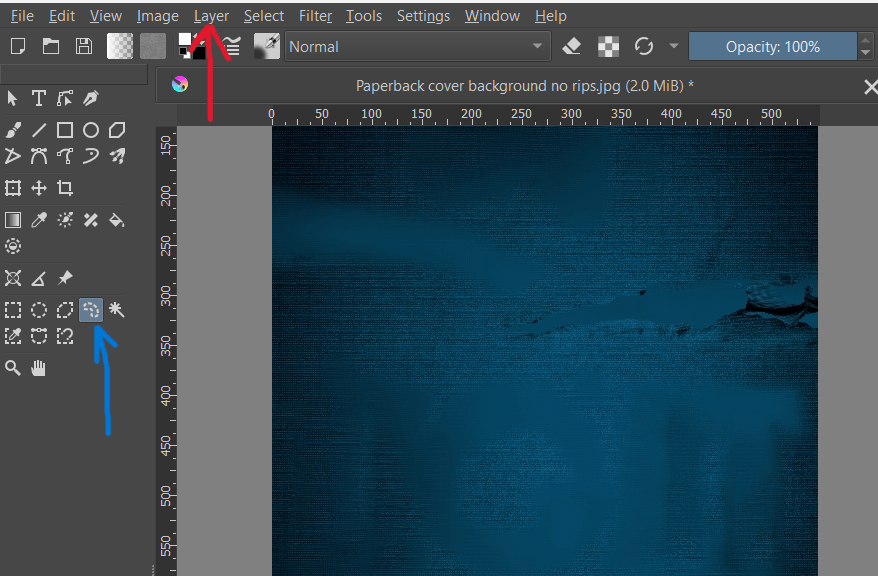
Here you can see the right rip as a Layer over the unripped background. The blue arrow is pointing to the Freehand Selection tool; the red arrow is pointing to the Layer drop-down menu.

Next, I used the Freehand Selection Tool to draw an outline around the rip. The rip’s edges being messy, it didn’t need to be perfect. Once I had a dotted outline around the rip, it was time to start manipulating it. For that, I used the Transform tool, which turned my original selection into a box. So, I dunno, maybe any selection tool would have worked, not just the freehand one. Like I said, I didn’t actually know what I was doing.
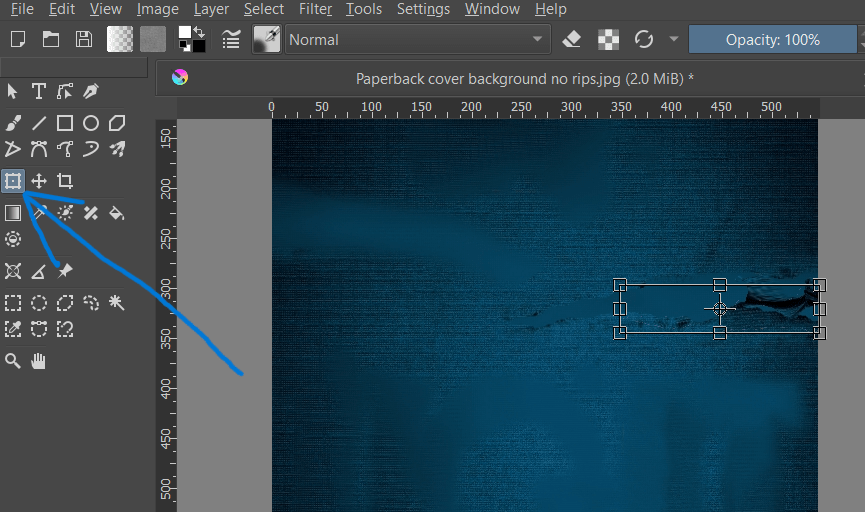
Blue arrow is pointing to the Transform tool. You can see the box around the rip.

ANYWAY: next, I selected Warp from the tool menu on the righthand side of the screen.
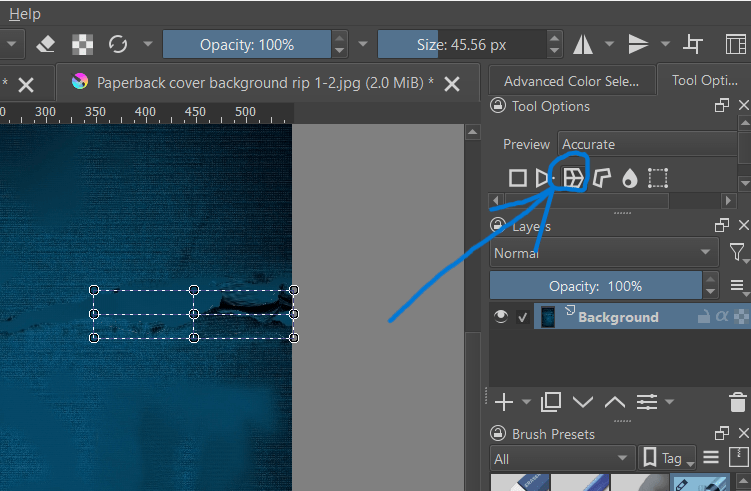
Blue arrow is pointing to the Warp tool.

This allowed me to pull and stretch – warp – the selected part of the image using the points on the box. Because the first frame of my animation was the unripped fabric, the next frame had to show just the very beginnings of a rip. And the next frame, a little more. And the next frame, a little more.
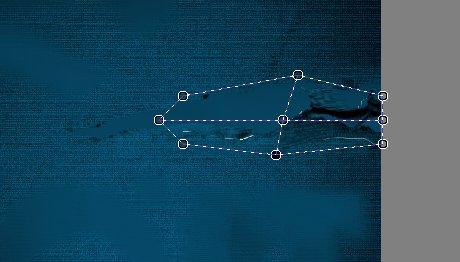
Here you can see the Warp tool in action, squeezing and stretching the rip to make it appear gradually larger.

From that one Krita project, just by clicking “Save As” over and over, I was able to make the rip “happen,” frame by frame – just as God and Ray Harryhausen intended. Once that was done, I repeated the same steps for the left rip. All told, it took 25 frames for the right rip to complete, and 12 for the left.
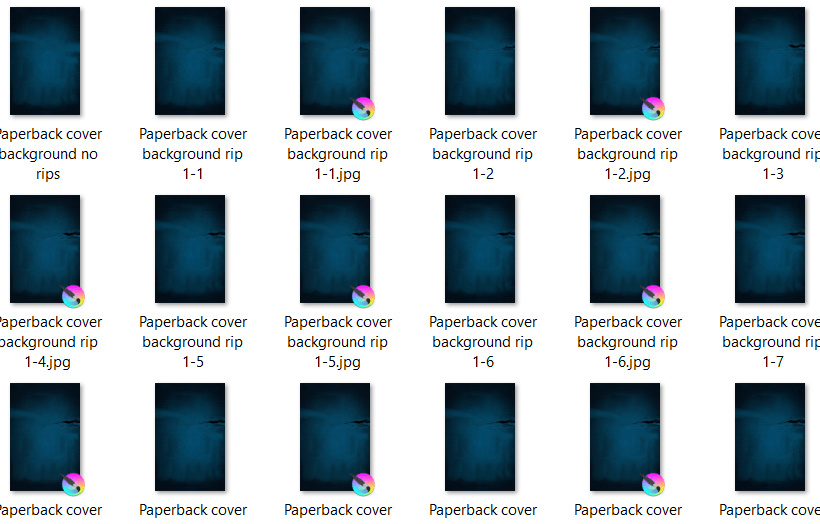
A selection of the stop-motion frames I created to make the rip sequence. If you do this, make sure you number the frames carefully.

All the work I did in Krita was, by far, the most time-consuming part of the process. But now that was all in the bag. It was time to move on to CapCut.2
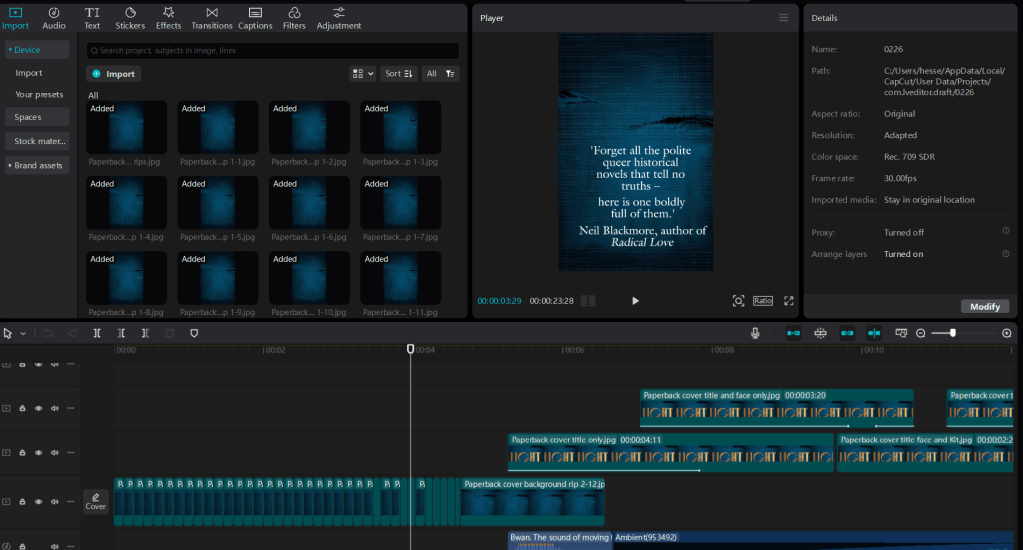
CapCut project screen with the book trailer for Lightborne loaded. I’m using version 4.6.0.

CapCut looks complicated, but it’s a drag-and-drop platform, so even a luddite like me can use it. (And it’s certainly not the only platform out there either!) In the top left corner, you import whatever image or video files you intend to use in your project. Right of that is the preview box, so you can see what your video looks like as you work. Across the bottom of the screen is your actual workspace, where you can drag and drop in your images frame by frame and layer by layer.

I started by importing all the many, many “rip” animation frames I had created, in the proper sequence. Then it was just a matter of adding them to a playback track, or layer, which is done with a click. The transformation from static frames to animation was instantaneous. A bit of tweaking with the playback speed, and my blue fabric ripped – not perfect, but this isn’t about smooth, shiny perfection. We want “handcrafted with love.”
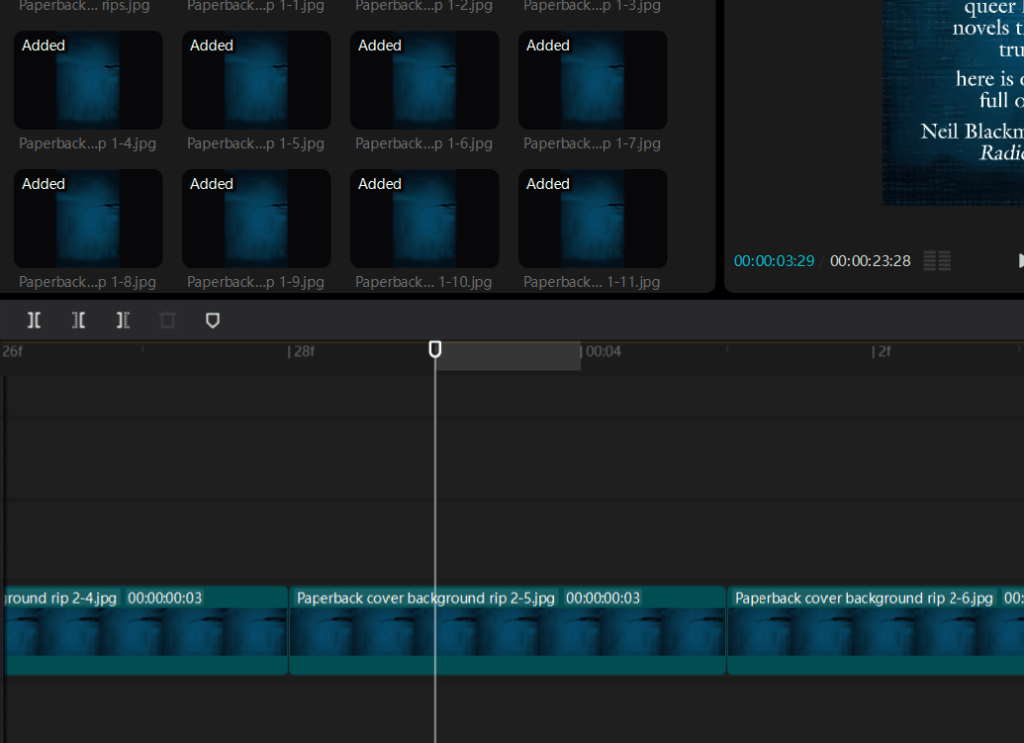
Top right you can see the imported animation frames, ready to use. Below, the playback with the frames in place. I found that giving each frame a duration of .03 seconds gave the most lifelike result.

Now, I had to make the other elements of my cover fade in, one by one. Remember, I had already created numerous versions of my cover, each with different elements Smart Patched out. Now it was time to use them.

To make the title fade into view, I imported the image of the cover with all elements removed except the rips and the title text. Importantly, I added this to a playback layer separate from the ripped fabric layer, and dragged it to pick up at about the same point where the rip sequence ended, leaving a little overlap, but not too much.
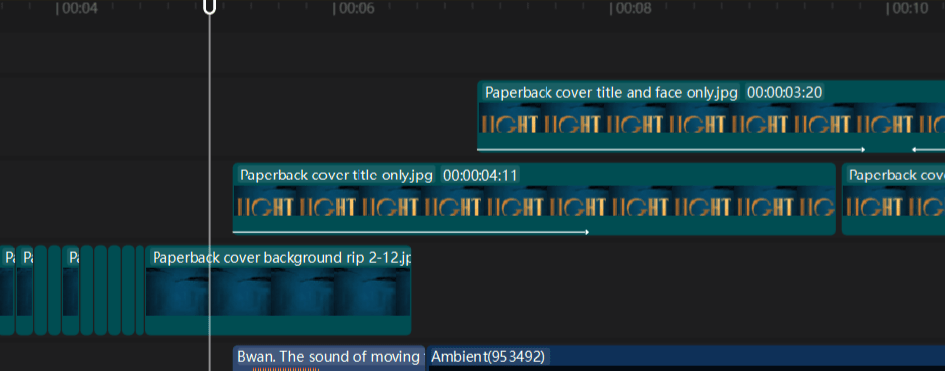
In the bottom playback layer is the ripped fabric animation, showing where it overlaps with the title image in the layer above it. As one layer fades out, another fades in.

I then used CapCut’s library of free effects to make the title text fade into view by applying the Fade-in effect to the title layer. Because I only overlapped the two playback layers slightly, this created a “firelight” effect all its own, as the rip sequence layer faded to black and the title layer faded in. Which was a nice surprise.

Using another image file that preserved the rips, title, and face, I repeated these steps to make the face of Kit Marlowe fade into view inside the O in Lightborne. Looked pretty cool, if I do say so.
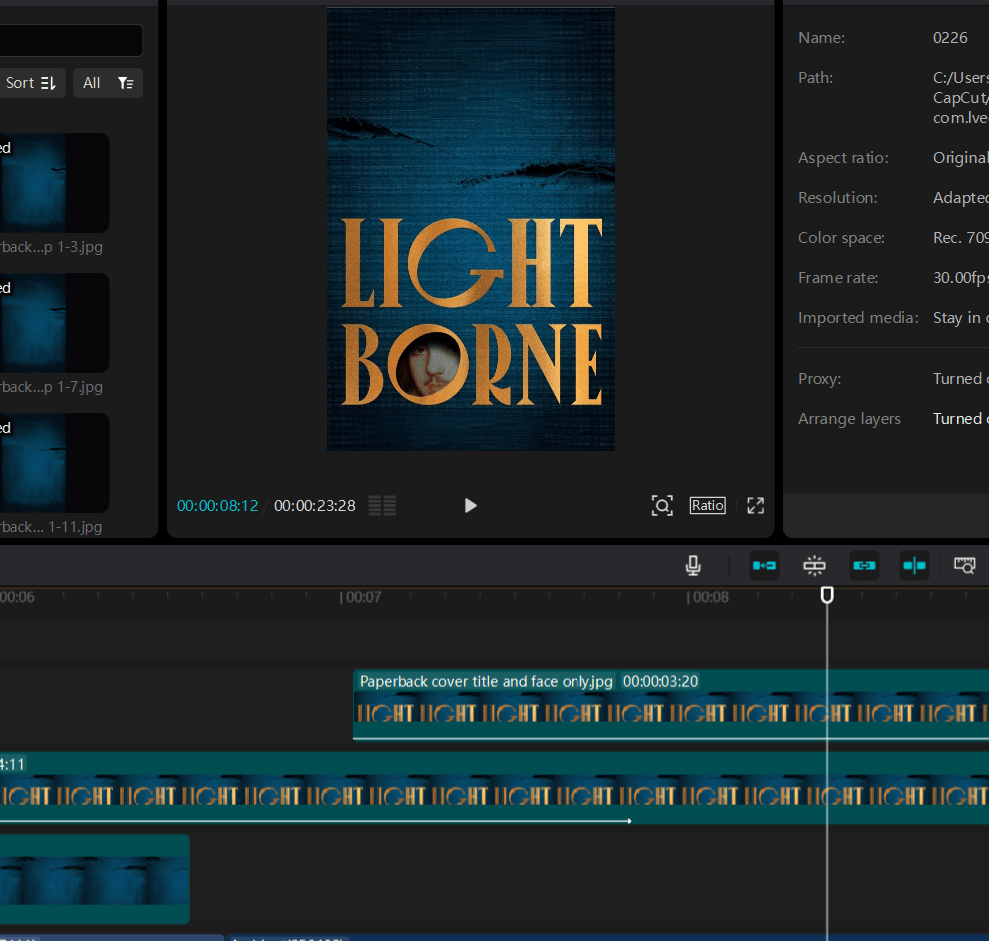
Here you can see the face just fading into view on its separate playback track (top).

As you can see from the image above, it took three playback layers to get to this point, but it was really just a matter of moving them around and playing with the Fade filters until they did what I wanted. Rinse and repeat with the other image files I had created in Krita, letting each element fade in one by one, and soon I had a pretty nice looking book trailer. But it still needed a little pizazz.

To add additional text and audio, I used CapCut’s built-in library of fonts, sound effects, and rights-free music. I went through at least 15 different versions of the sound of fabric ripping before I found the right one. Fire crackling – that was easy. And although the perfect music took much longer to find – a bit creepy, very atmospheric, not too modern – once I knew I had it, the whole room lit up.3

At long last, I could hit “play” on my very own, homemade book trailer – a fair approximation of the vision that had sent me careening down this rabbit hole in the first place.

Oooooooh, aaaaaaaaahhhh.

“Wow, Hesse, that seems like a lot of work for a 30-second video. Was it worth it?”

Depends on how you measure worth, I suppose. I doubt the trailer sold too many books, if any. It sure as hell didn’t go viral or even get tons of “likes” on the socials. But I didn’t make my book trailer hoping it would go viral. I made my book trailer to celebrate all the hard work I’d already put in, and to showcase what I still think is a beautiful, evocative cover design. It was hard work, but it was also a lot of fun.

I’m sure some people think I’m nuts for going to all this trouble when I could have achieved something similar, and flashier, just by plugging a prompt into a chat-box. And I’m sure some people think the finished product looks like crap and I should have spent my precious time doing something else. But, you know – I just don’t care. I made something; I learned something; I learned that I could do something I didn’t know I could. That’s its own reward.

I already spent years writing a book, after all. What’s 8 hours compared to that?

  1. Okay technically I was using what’s known as the traditional animation technique because it relied on 2D images, but I got the idea while thinking about Phil Tippett and how fucking awesome he is, so let’s just call it stop-motion in honor of him. ↩︎
  2. CapCut has, since the making of my trailer, loaded itself up with “AI powered” features. However, like most platforms that claim to be loaded-up with “AI powered” features, you can still use the thing without touching them. They’re just there in the corner of the screen, begging for your attention like Clippy of MS Word yore. ↩︎
  3. This was done before AI-generated music basically wiped-out what I imagine must have been a thriving cottage industry of rights-free music composers (so, like, a year ago). If you want human-made music to underscore your trailer, you might have to dig a bit deeper in CapCut’s library nowadays. But again – it’s worth the effort. ↩︎

Lightborne Updates: Cover Sneak Peek!

Before we get into the thing you’re actually here for, let me start this one off by saying, if you’re not listening to the 7AM Novelist Podcast with Michelle Hoover, then start now – not just because yours truly makes the occasional appearance on the show, but because I do so in excellent company. This latest season features an all-star cast, including Anjali Duva, Ron Maclean, Nancy Crochiere, Sara Johnson Allen, Marjan Kamali, Joanna Rakoff, Emily Ross, Andrea Meyer, Virginia Pye, Henriette Lazaridis, Colwill Brown, Crystal King, Chris Boucher, Dawn Tripp, Hank Phillippi Ryan, Mark Cecil, Jenna Blum, Jane Roper, Ethan Gilsdorf, Whitney Scharer, Shalene Gupta, Louise Miller, and many more, all ready to help struggling writers work through whatever’s holding them back from getting words on the page.

Recently there were two back-to-back episodes dealing with the stressful process of publishing your first book, as Aube Rey Lescure hopped on to discuss the launch of her debut River East River West, and Kasey LeBlanc, Christine Murphy, and Aaron Hamburger came on to talk about the travails of starting book 2. Listening as someone who can relate all too well to the topics at hand, I found my mental state veering wildly between excited and despairing, inspired and terrified.

Let’s be real: publishing a book is the thing we writers tell ourselves will finally make our lives fall into place, fix our self-esteem issues, vindicate our hard work, even solve lifelong crises of identity. For over a decade, it was the thing I felt I had to do, if only to justify the time and money I’d sunk into writing my soon-to-debut novel, Lightborne. And of course, I am thrilled beyond belief that it is finally happening. But I’m also learning that publication will fix absolutely none of the above problems. It will, in fact, create a few new ones.

Now that debut authors are speaking more openly about the mental health struggles they face in the lead-up to pub day, what emerges is the clear need for us to support one another. The tawdry, soul-crushing business of self-promotion can feel desperately lonely; the burgeoning public exposure can make you paranoid and crash whatever modicum of self-esteem you’d built-up since surviving high school. The dark, primal urge to dig yourself a burrow and hide in it starts to take over.

But this is why community is so essential to the debuting author. It may come via social media, or through writing groups and classes, or – just maybe – through fellow listeners of a writing podcast. I’m very fortunate to know many of the panelists on the 7AM Novelist through the legendary Boston writing center, Grub Street, where I participated in the Novel Incubator Program some [cough cough] years ago. But one of the great things about the 7AM Novelist is how it allows writers from all around the world to make connections. Seeing ideas exchanged and friendships forming in the chat box during every live episode recording truly warms this withered old heart.

So I very much hope anyone reading this will be sure to check out the show and support the author panelists: google them, subscribe to their newsletters, buy their books! This season is particularly exciting because every episode deals with questions submitted by listeners – even though I’m on again tomorrow, Jan 11th, I still don’t know what topic we’re going to get. So if you have a sticky issue to work out with your WIP, your writing practice, or career, please do go to the podcast page and submit your answer to the question, “What’s holding you back?” Maybe I’ll even get a chance to help you through it.

And now that you’ve scrolled all the way down here, you may collect your reward: a first look at Lightborne’s lush, evocative final cover!

Via Atlantic Books

As you can see, the cover will build on the proof design, using the same black and gold damask pattern and a simply gorgeous font based on 16th century typography. I’ve been informed that the pattern will, in fact, be stamped in gold foil – so in person, it’s going to be stunning!

Preorders are rolling out, so please check with your local booksellers. For those who use NetGalley, ARCs will be available soon.

Lightborne Updates: ARCs are in, and so is Impostor Syndrome

Last week I had the immense privilege of visiting my publisher Atlantic Books’ offices in person. Little did I know when I was making aimless circles around Bloomsbury, hopelessly lost, that once I got there I would be greeted by printed, jacketed, ready-to-go ARCs of my debut novel – a whole pile of them awaiting my woefully unpracticed signature.

Photo by Laura O’Donnell

I’d been convinced that the ARCs were still weeks away, if not months. Being able to pick up a copy, flip through the pages, and see what I’d thus far known only as a Word document looking very much like a real book put me into some kind of fugue state. I barely remember signing the copies, only that my signature degenerated steeply from one copy to the next. By the time I got to the last one it looked like a toddler had scribbled all over the page.

Of course I’m still excited and riding high from the experience, although an astonishing amount of terror has since crept in. Things are moving quicker than I’d expected, which means my little window of peace and privacy is closing, and not only must I come to terms with the fact that the need to self-promote is inevitable, but it is also imminent. As in, I clearly should have started doing it weeks ago.

I think many writers break into a cold sweat at the thought of having to put themselves “out there,” whether it stems from a simple dislike of the spotlight or the crippling, unshakable belief that we are not worthy enough or smart enough or good enough, and sooner or later the world will catch on and punish us for daring to take up space. The latter is certainly true for me. The law of impostor syndrome is that the voice of self-doubt will always grow louder and stronger when presented with mounting evidence that it’s really full of shit. (Much like people who are full of shit.) The closer I come to any kind of success, the easier it is for me to convince myself I’m not deserving of it.

The most constructive way I’ve found of dealing with impostor syndrome so far is to think of it as a necessary stage in the process of working towards a goal, and moreover, a sign that things are, in fact, going pretty well. This doesn’t silence the voice of self doubt, but it does put it at a slight remove. Fortunately, I’m riding a train over whose path I have zero control, which means I have no choice but to keep moving forward. It’s surprisingly easy to be braver about taking certain steps once the option of turning back is gone.

Besides, the scenery really is lovely. Look at this, LOOK AT THIS!

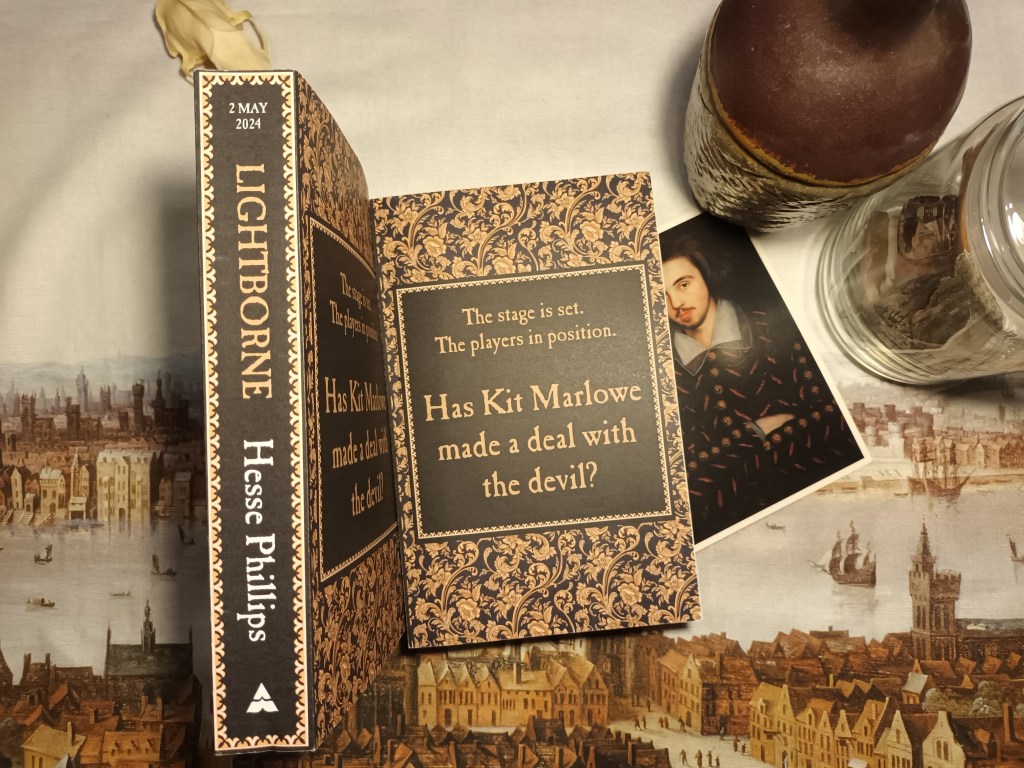
Color photo of a pair of books decorated in black and gold damask print lying on top of Wenceslas Hollar's Panorama of early modern London. One book is shown face-up, the other displays the spine, which reads "2 May 2024 LIGHTBORNE Hesse Phillips." The cover on the other book features a black square framing the tagline, "The stage is set. The players are in position. Has Kit Marlowe made a deal with the Devil?" Peeking out from under neath the face-up book is a postcard of Christopher Marlowe's alleged portrait.
Of course I did a photo shoot with my book.

Lightborne Updates: Proofs, Proofs, Proofs!

We’re just about into that incredibly exciting stage where things start getting printed on paper – meaning that I’ve recently received the most important pdf file of my entire existence so far, and have spent the past week going over it with a fine-toothed comb. It feels weirdly unceremonious to see my proof sitting open in a Chrome tab along with email and about 50 other tabs worth of research for my next book, as if it were just another JSTOR article that I stopped skimming last week and forgot about.

Fortunately, it is gorgeous, as you can see from the image above. I’m thoroughly impressed with my publisher’s choice in fonts, all of which are wonderfully evocative of Elizabethan-era typefaces. And then there’s the uncanny resemblance between the header font and the tattoo on my right forearm:

Yup, that’s me, in my bathroom, because let’s face it, it’s the only room in the house with good lighting. You can probably tell from my face that I’d just spent two hours getting stabbed with tiny needles.

I got myself the tattoo last year to celebrate signing my deal with Atlantic. A more superstitious person than myself might take the resemblance as some kind of omen. Lente currite noctis equi (“run slowly, horses of the night”) is a phrase that originally appeared in Ovid’s Amores, a series of quite randy love poems which my protagonist, Christopher Marlowe, translated into English as a student at Cambridge. It also, and perhaps more famously, appears in Marlowe’s own play Doctor Faustus, used by the titular character as a magical incantation in effort to halt time in its tracks. Notably, the incantation does not work – Faustus can’t escape his deadline with the Devil, who promptly shows up and drags him screaming into hell.

So, uh, not sure whether that’s a good omen or a bad one, but it is at least a lovely coincidence.

From here, the next stage is to print ARCs (advanced reader copies), which will hopefully lead to some nice endorsements from people far more interesting and successful in life than myself. After that, we’ll begin work on the final text for publication in May, at which point my book will truly have grown up and moved out of the house for good. For now, it’s thrilling to see it all dressed up in a spiffy new suit, looking very much like a “real” book, albeit in digital form.

Things are definitely heating up, so hopefully I’ll have more news to share soon!